Open source · Bitcoin only · iPhone

Take back a stuck Bitcoin payment.

Sent the wrong amount, or it’s been waiting for hours with a low fee? If it hasn’t confirmed yet, Takeback can speed it up or send the coins back to you, in one tap.

Your key never leaves your iPhoneNever saved, wiped after useOpen source on GitHub
9:41
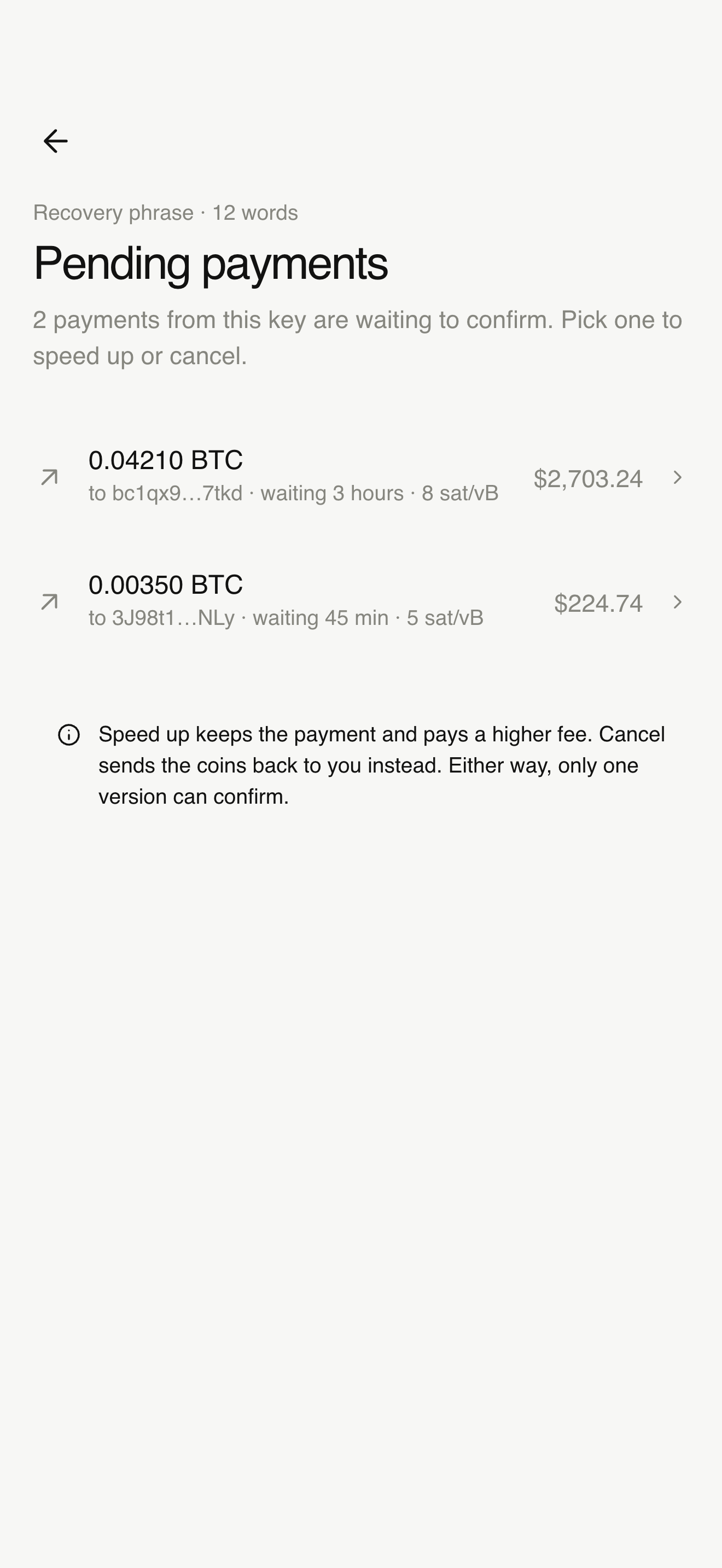
Pending payments found from your key
9:41
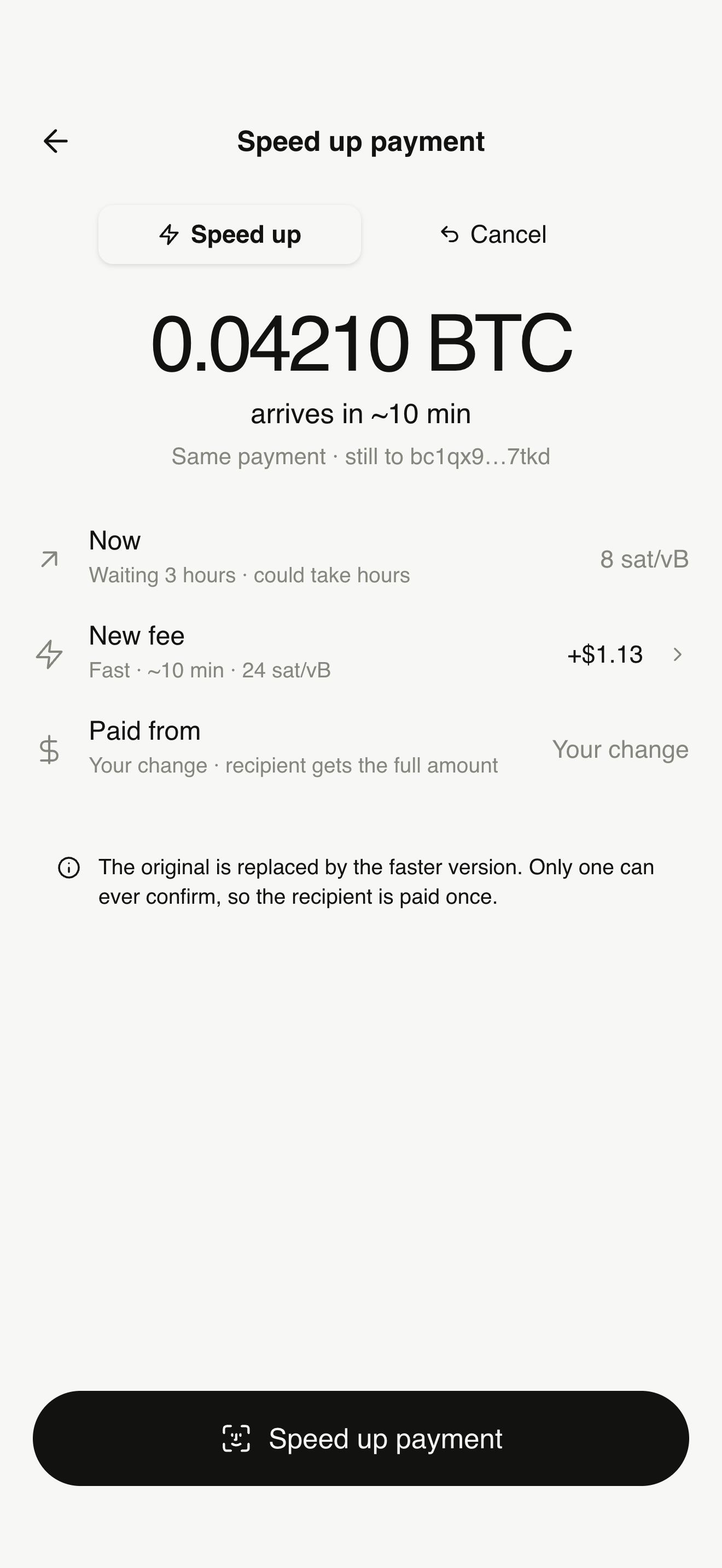
Speed up payment screen showing 0.04210 BTC arriving in about 10 minutes
9:41
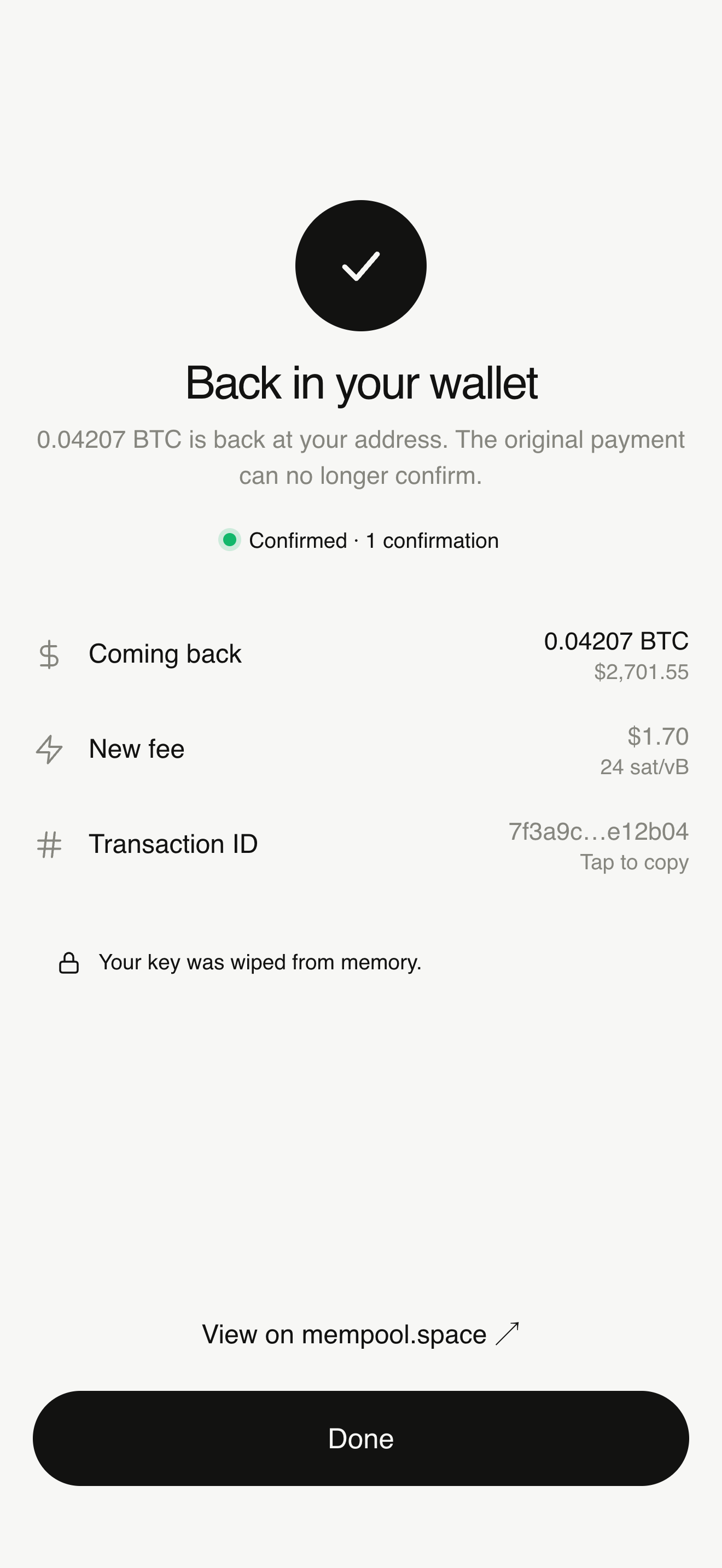
Canceled payment back in your wallet, confirmed
Stuck · waiting 3 hours
Taproot · bc1pNative SegWit · bc1qNested SegWit · 3…Legacy · 1…12–24 word recovery phraseBIP39 passphraseWIF compressed & uncompressed64-character hex keyMini private keyxprv · yprv · zprvCustom derivation pathsElectrum serversmempool.spaceTaproot · bc1pNative SegWit · bc1qNested SegWit · 3…Legacy · 1…12–24 word recovery phraseBIP39 passphraseWIF compressed & uncompressed64-character hex keyMini private keyxprv · yprv · zprvCustom derivation pathsElectrum serversmempool.space
Two ways out

Speed it up, or send it back.

Bitcoin lets an unconfirmed payment be replaced by a new version that pays a higher fee. Takeback builds that new version for you, signs it on your iPhone and sends it to the network.

Speed up

Same payment. Higher fee. Confirmed sooner.

The recipient still gets the same amount. You pay a little more so miners pick it up next, usually within about 10 minutes.
9:41
Speed up: 0.04210 BTC arrives in about 10 minutes
Cancel

Changed your mind? The coins come back to you.

Takeback replaces the payment with one to your own address, from the same key. Once it confirms, the original can never confirm.
9:41
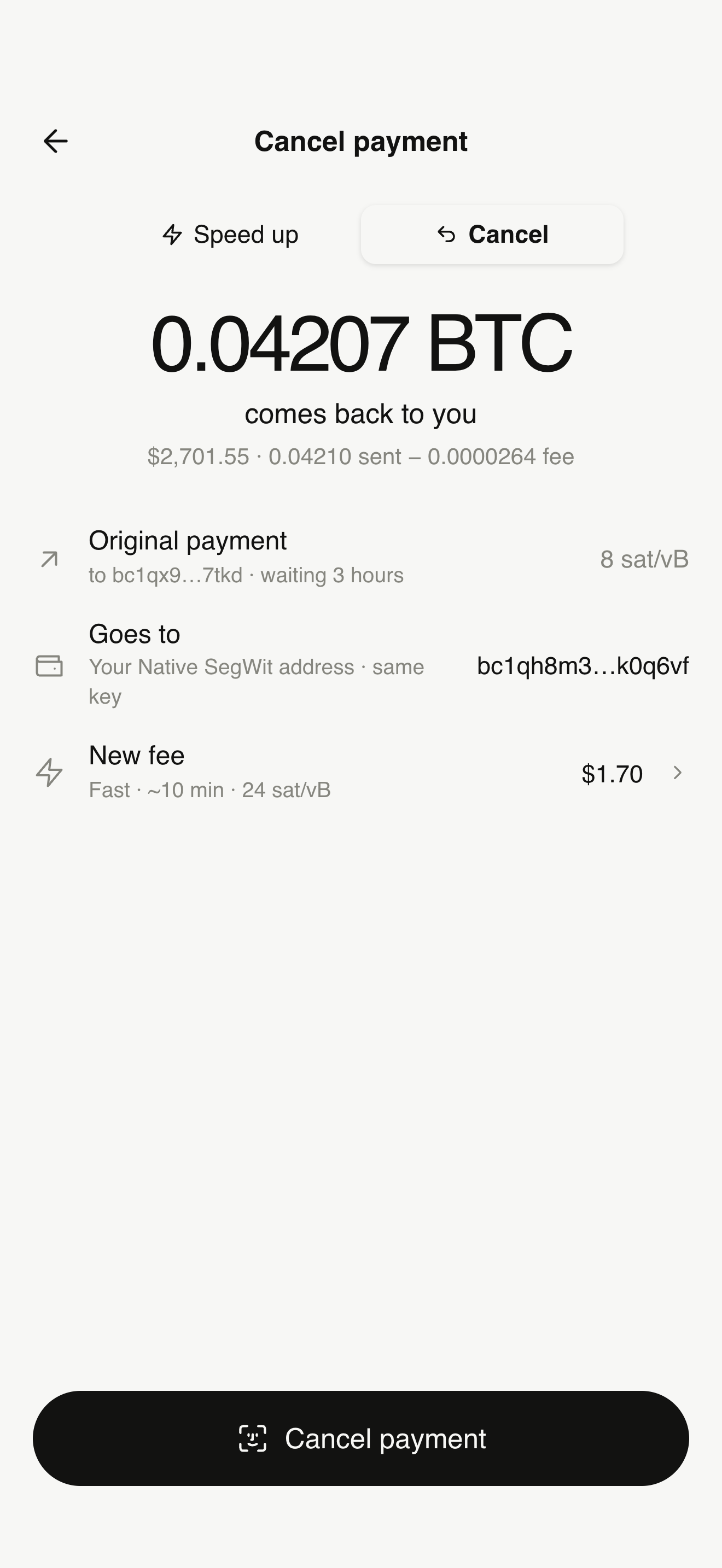
Cancel payment: 0.04207 BTC comes back to you
Your key, your iPhone

Held in memory. Never saved. Wiped when you’re done.

Takeback has no account, no server of its own and no database. Your recovery phrase or private key only lives in your iPhone’s memory while you use it.
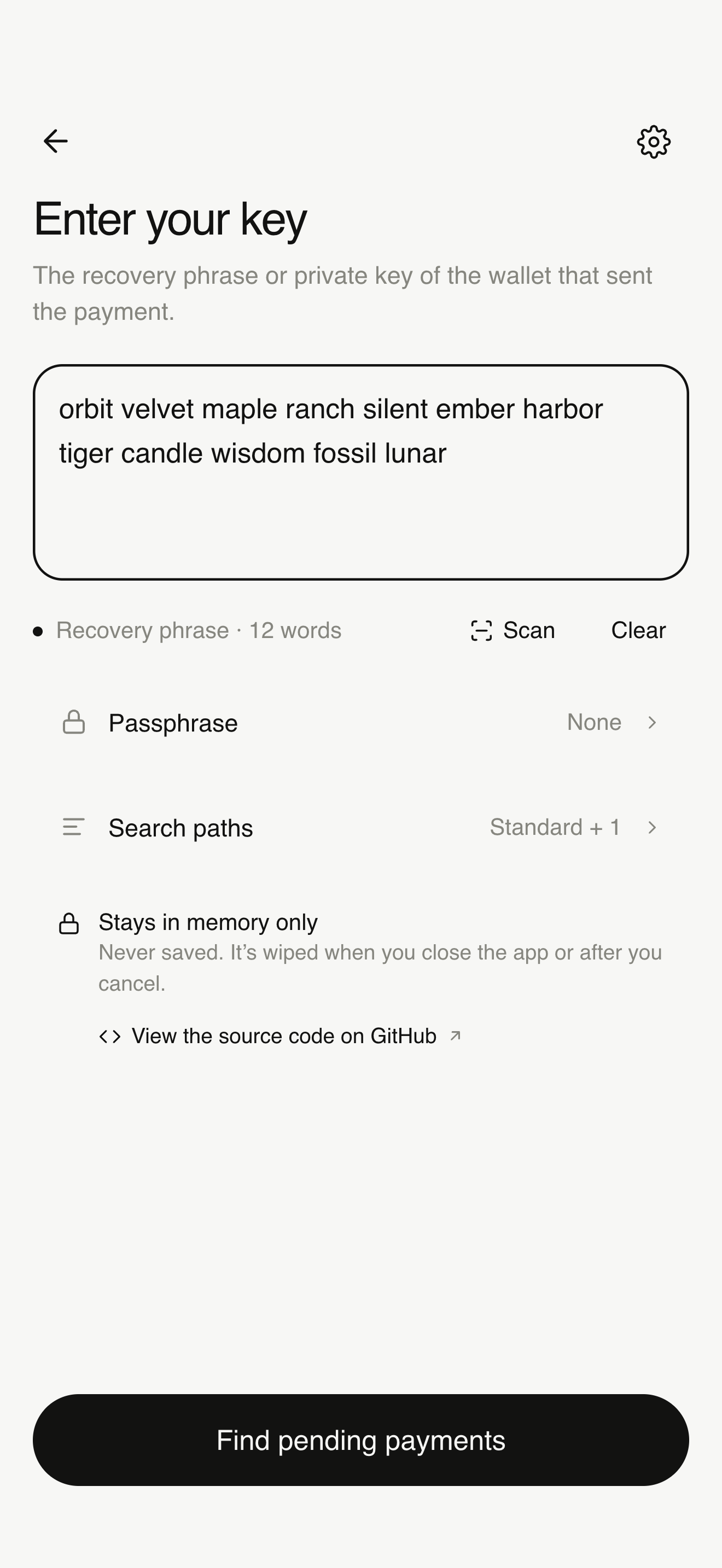
  1. You paste or scan your keyIt stays in memory on this iPhone. It is never written to storage, iCloud, backups or logs.
  2. Addresses are worked out on the deviceTaproot, Native SegWit, Nested SegWit and Legacy addresses are derived locally.
  3. Only addresses go to the networkTakeback asks Electrum or mempool.space which payments are pending. Your key is never sent.
  4. You approve with Face IDThe new transaction is signed on your iPhone, then broadcast.
  5. The key is wipedAfter the payment is replaced, or when you close the app, the key is cleared from memory.
9:41
Enter your key screen with a recovery phrase and a Stays in memory only note
Open source

Don’t trust us. Read the code.

Every line of Takeback is public on GitHub. Anyone can read how keys are handled, build the app themselves, and run it on their own device.

  • Read it. See exactly how keys are parsed, held in memory and wiped.
  • Build it. Clone the repository, open it in Xcode and run your own copy.
  • Verify it. Compare the build fingerprint shown in the app with the one published for each release.
Terminal
# Get the source
$ git clone https://github.com/devdasx/takeback.git
$ cd takeback

# Open in Xcode and run on your own iPhone
$ open Takeback.xcodeproj

# Everything runs on-device. No API keys,
# no accounts, no backend of ours.
How it works

Four steps. About a minute.

9:41
Enter your key
1

Enter the key that paid

Paste or scan a recovery phrase, WIF, hex, mini key or xprv. The format is detected for you.
9:41
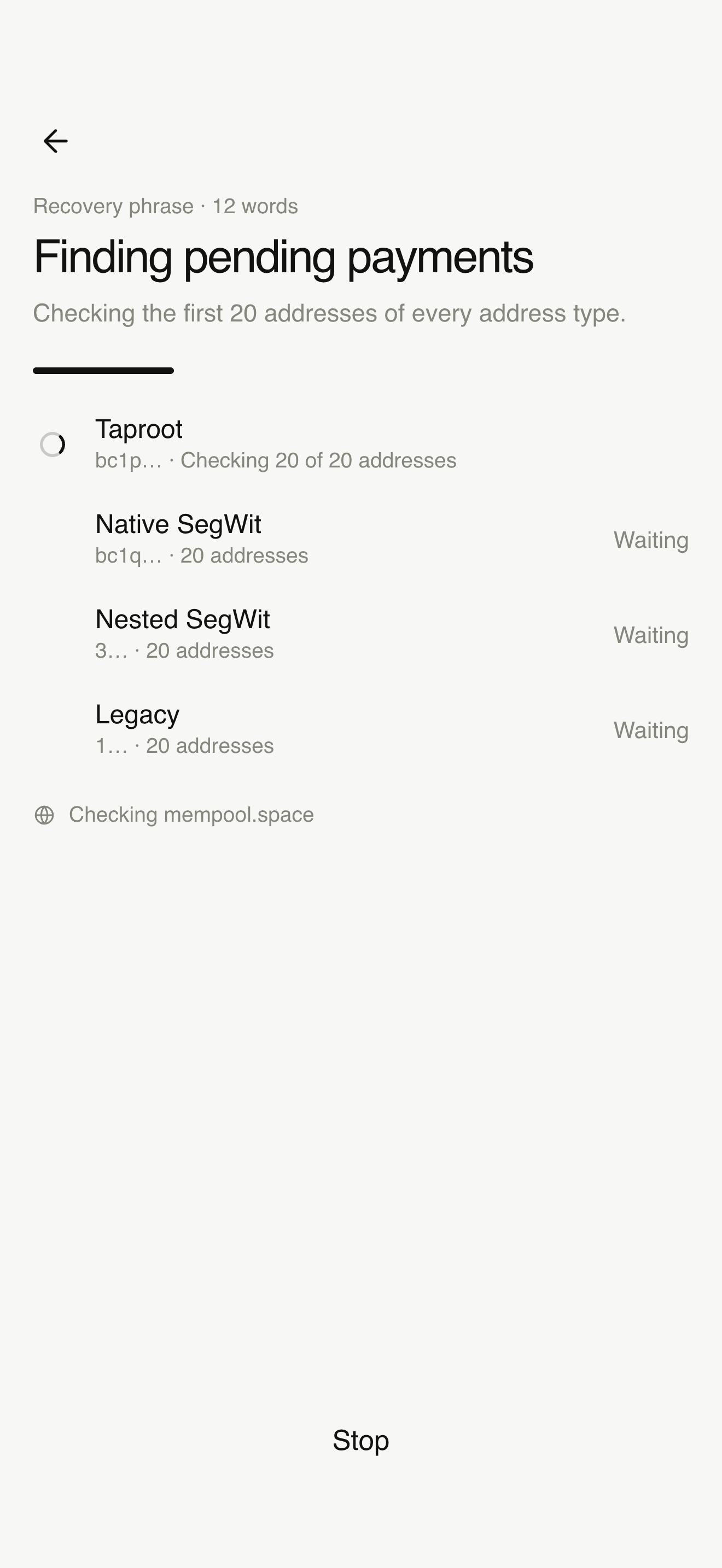
Finding pending payments across address types
2

Takeback finds the payment

It checks every address type the key could have used and lists what’s still unconfirmed.

9:41
Speed up or cancel
3

Speed up or cancel

Pick a fee, check where the coins go, then approve with Face ID.

9:41
Canceled and confirmed
4

Watch it confirm

Follow it live from pending to confirmed. Your key is wiped from memory.

Honest about the limits

It works until the payment confirms.

Takeback uses Bitcoin’s own replacement rules. It can’t reverse a confirmed payment, and nobody can.

Takeback can help when

  • The payment is still unconfirmedIt’s waiting in the mempool, not in a block.
  • The coins came from your keyYou have the recovery phrase or private key that sent it.
  • There’s enough left for a higher feeThe replacement must pay more than the original.

It can’t help when

  • The payment has confirmedEven one confirmation makes it final.
  • Some coins came from another walletYour key alone can’t sign a replacement.
  • A miner already took the originalA cancel is a race. Act early and pick a high fee.
Questions

Frequently asked

Does Takeback store my recovery phrase or private key?

No. The key is held only in your iPhone’s memory while the app is open. It is never written to storage, the Keychain, iCloud, backups, analytics or logs, and it is wiped after you cancel or speed up, or when you close the app.

Can it cancel a payment that didn’t opt in to replacement (RBF)?

Often, yes. Since Bitcoin Core 28 (October 2024), nodes accept replacements by default even if the original didn’t signal replace-by-fee. Most of the network now relays them. It still isn’t guaranteed, because a miner may have already included the original.

Is a cancel guaranteed?

No. Canceling creates a new transaction that spends the same coins back to you with a higher fee. Miners usually prefer it, but if the original is mined first, the original wins. The sooner you act and the higher the fee, the better the chance.

Which wallets and keys work?

Recovery phrases (12–24 words, with an optional passphrase), WIF keys (compressed or uncompressed), 64-character hex keys, mini private keys, and xprv/yprv/zprv. Takeback checks Taproot, Native SegWit, Nested SegWit and Legacy addresses, and you can add custom derivation paths.

Who can see my addresses?

To find pending payments, Takeback asks a public server (Electrum, with mempool.space as a fallback) about your addresses. That server can see which addresses were looked up. You can use your own Electrum server in Settings. Your key is never sent anywhere.

Stuck payment? Take it back.

On iPhone. Open source. Your key never leaves your device.

Takeback app icon